YouTube Thumbnail Generator
Free AI YouTube Thumbnail Generator – Create Thumbnails Online
Related Tools












YouTube Thumbnail Generator AI Free – Create Viral YouTube Thumbnails in Seconds
Create professional, click-worthy YouTube thumbnails instantly with our YouTube Thumbnail Generator AI Free tool.
Enter your video title or topic, choose a thumbnail style, select a color theme, optionally add your channel name, and let AI generate thumbnail concepts designed to attract more clicks.
- No design skills.
- No login.
- No watermark.
- No subscription.
- 100% free forever.
Perfect for creators, YouTubers, agencies, marketers, educators, and faceless YouTube channels.
Generate AI YouTube Thumbnails Online for Free
Creating thumbnails manually can take hours.
Our AI-powered YouTube Thumbnail Generator helps you create thumbnails in seconds using simple inputs.
Just describe your video idea and generate ready-to-use thumbnail concepts instantly.
Whether you create:
- YouTube videos
- YouTube Shorts
- Tutorials
- Gaming content
- Educational videos
- Reaction videos
- Business content
This tool helps you create thumbnails faster.
What is a YouTube Thumbnail Generator AI?
A YouTube Thumbnail Generator AI is an online tool that uses artificial intelligence to create thumbnail concepts based on your video idea.
Instead of opening complicated design software, AI helps automate:
- Thumbnail composition
- Text placement
- Visual hierarchy
- Style selection
- Color combinations
- Attention-focused layouts
The goal is simple:
Create thumbnails that look professional and encourage viewers to click.
How Our AI YouTube Thumbnail Generator Works
Our tool is built for speed and simplicity.
Step 1 — Enter Video Topic or Title
Describe your video.
Examples:
How To Make $1000/Month with AI Tools
I Tested 50 SEO Tools
30 Days YouTube Challenge
AI uses this as the foundation.
Step 2 — Choose Thumbnail Style
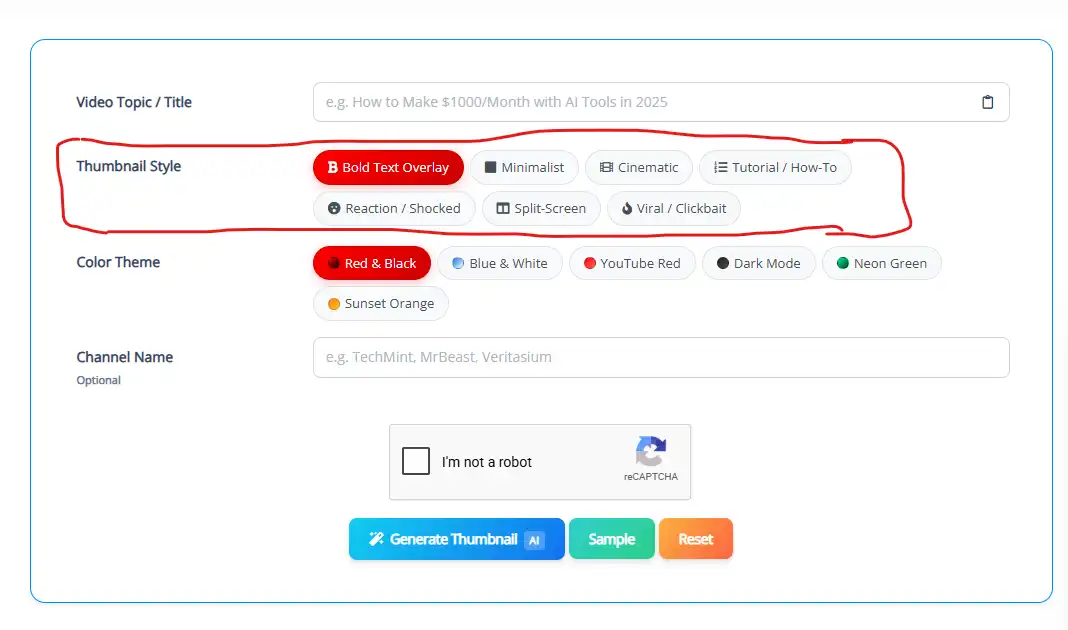
Select the style that matches your content.
Available styles include:
- Bold Text Overlay: Large readable text designed for visibility.
- Minimalist: Clean and modern thumbnail style.
- Cinematic: High-impact visuals with dramatic composition.
- Tutorial / How-To: Designed for educational content.
- Reaction / Shocked: Optimized for expressive creator content.
- Split-Screen: Compare ideas visually.
- Viral / Clickbait: Attention-first layout style.
Step 3 — Select Color Theme
Choose a visual mood.
Available themes:
- Red & Black
- Blue & White
- YouTube Red
- Dark Mode
- Neon Green
- Sunset Orange
Color selection helps keep your thumbnails consistent.
Step 4 — Add Channel Name (Optional)
Add your channel name if you want AI to generate thumbnails with a more branded feel.
Examples:
TechMint
MrBeast
Veritasium
Step 5 — Generate Thumbnail
Click Generate Thumbnail AI.
Your thumbnail concepts will be created instantly.
Why Use Our Free AI YouTube Thumbnail Generator?
100% Free
Generate thumbnails without paying.
No Login Required
Use the tool instantly.
No Watermark
Export clean thumbnails.
Fast AI Generation
Get results within seconds.
Beginner Friendly
No editing or design experience needed.
Features of Our YouTube Thumbnail Generator AI
AI Thumbnail Creation
Generate thumbnail concepts from text.
Multiple Thumbnail Styles
Choose visual directions before generation.
Smart Color Themes
Create better visual consistency.
Channel Personalization
Generate thumbnails based on your channel identity.
One-Click Generation
No complicated editing.
Browser-Based Tool
Works online on all devices.
Best YouTube Thumbnail Practices (Built Into This Tool)
Great thumbnails usually follow simple rules.
Use Large Readable Text
People mostly browse on mobile.
Focus on One Main Idea
Avoid clutter.
Use High Contrast
Make elements stand out.
Keep Branding Consistent
Colors improve recognition.
Match Thumbnail to Video Content
Avoid misleading visuals.
Who Should Use This Tool?
Perfect for:
- YouTubers
- Content creators
- Marketing teams
- Agencies
- Educational channels
- Gaming creators
- AI creators
- Faceless channels
- Small businesses
Use Cases
YouTube Videos
Generate engaging thumbnails.
Tutorials
Create educational visuals.
Viral Content
Build attention-grabbing concepts.
Shorts Content
Generate mobile-friendly layouts.
Business Videos
Create clean professional thumbnails.
Why AI Thumbnail Generation Saves Time
Traditional thumbnail workflows require:
- Design software
- Manual editing
- Stock searching
- Color adjustments
- Typography work
AI removes most of this work.
You focus on creating videos.
The tool handles thumbnail generation.
Frequently Asked Questions
Is this YouTube Thumbnail Generator AI free?
Yes. It is completely free.
Do I need to create an account?
No. No signup required for limited time, but if you want more generations in a day, you need to login to get more free credits.
Does the tool add watermarks?
No. Generated thumbnails are watermark-free.
Can I generate thumbnails from text?
Yes. Simply enter your video title or topic.
Can I choose thumbnail style?
Yes. Multiple styles are available.
Can I choose colors?
Yes. The tool supports different color themes.
Does it work on mobile?
Yes. Works on mobile, desktop, and tablets.
Create Better YouTube Thumbnails with AI
Stop spending hours designing.
Generate professional YouTube thumbnails instantly using AI.
No login.
No watermark.
100% free.
Start generating now.